You want to top up your BISON account to buy cryptocurrencies? The classic SEPA transfer is the standard method for this. Here you will learn what you need to pay attention to so that your money arrives safely and quickly in your BISON account.
We would like to point out: No deposits via Paypal possible!
Deposit methods
| Method |
Availability |
Fees |
Best for |
| SEPA transfer |
1–2 business days |
Free |
Large amounts |
| SEPA instant transfer |
Seconds |
Free* |
Fast bank transfers |
| Instant deposit (Card / Pay) |
Seconds |
2.49% |
Quick top-ups |
| SWIFT transfer |
Not supported |
Not supported |
Not supported |
*Possible fees charged by your bank.
Bank details - Your personal deposit IBAN
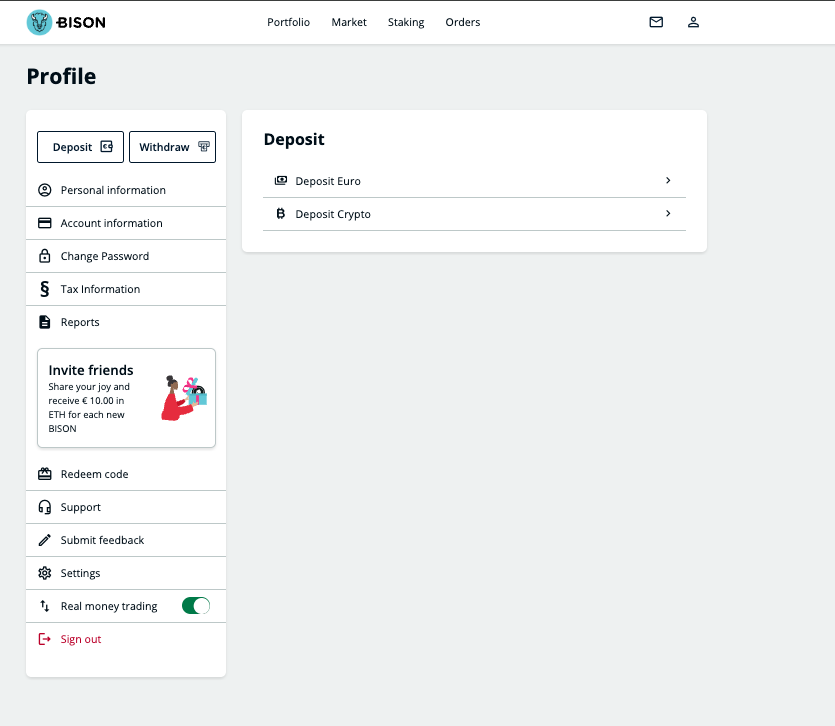
To deposit euros, open your BISON app and navigate to “Deposit” ➞ “Euro”. Use exclusively the IBAN shown there for your transfer.
Since we work with various banking partners (Solaris SE and Deutsche Bank), each user has their individual deposit IBAN. Your app always shows you the exact correct details for your account.
Transfer - Purpose of use
For the allocation of your deposit, no purpose of use is required. The system automatically assigns your transfer based on your personal BISON IBAN.
Important: Your deposit account at your bank must be exactly in the same name as your BISON account. Deposits from third-party accounts (e.g. friends, relatives or company accounts) cannot be accepted.
Security - Payee verification (VoP)
When you enter the transfer in your online banking, many banks apply payee verification (Verification of Payee), an EU-wide security measure regulating SEPA and instant transfers. This requires all banks and payment service providers to automatically match the payee name and IBAN to increase security and protect against fraud and misdirected payments.
It is possible that the payee name "EUWAX Aktiengesellschaft" is suggested to you or a warning is displayed. This is completely correct! EUWAX AG is the operator of BISON. You can confirm this message with your bank and authorise the transfer.
Good to know: The payee verification is only for your protection. The warning is feedback from your bank, not an instruction.
Framework data duration, fees, limits
Fees: Deposits via SEPA transfer are completely free of charge for you.
Duration:
A standard SEPA transfer usually takes 1 to 3 banking days. Please note that weekends and public holidays can extend the duration accordingly, as banks do not process bookings on these days.
The SEPA instant transfer is a fast form of money transfer where the amount is available in the account within a few seconds. In addition, there are no time restrictions for execution - available 24 hours, 7 days a week.
Limits for deposits:
- Deposits of larger amounts require manual review
- Please contact BISON service via the following contact form for this
Deposit - Instructions
▶ Go to Account - Deposit and select "Deposit EUR"
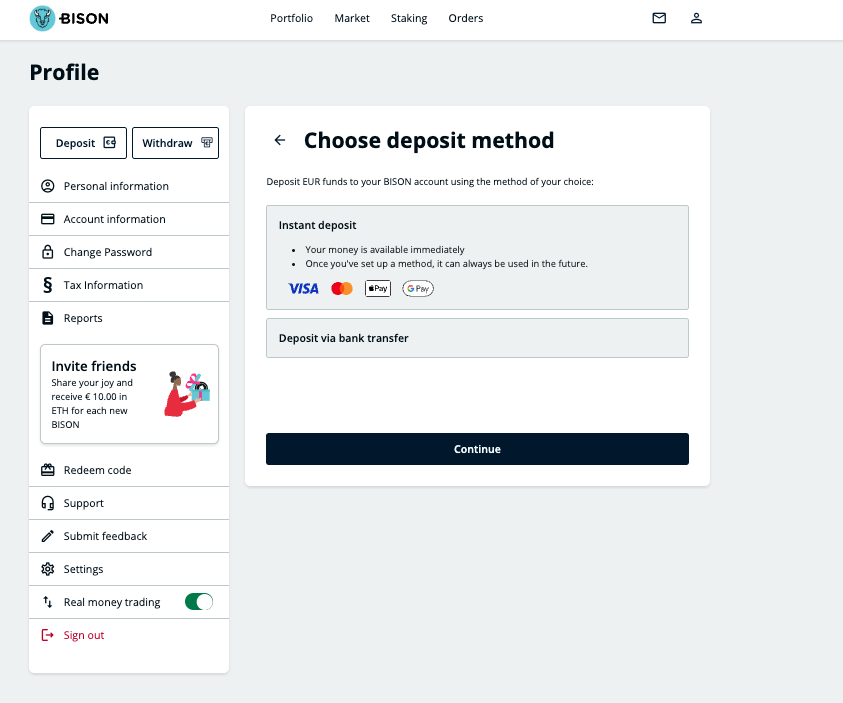
▶ You will then be shown the IBAN for the transfer
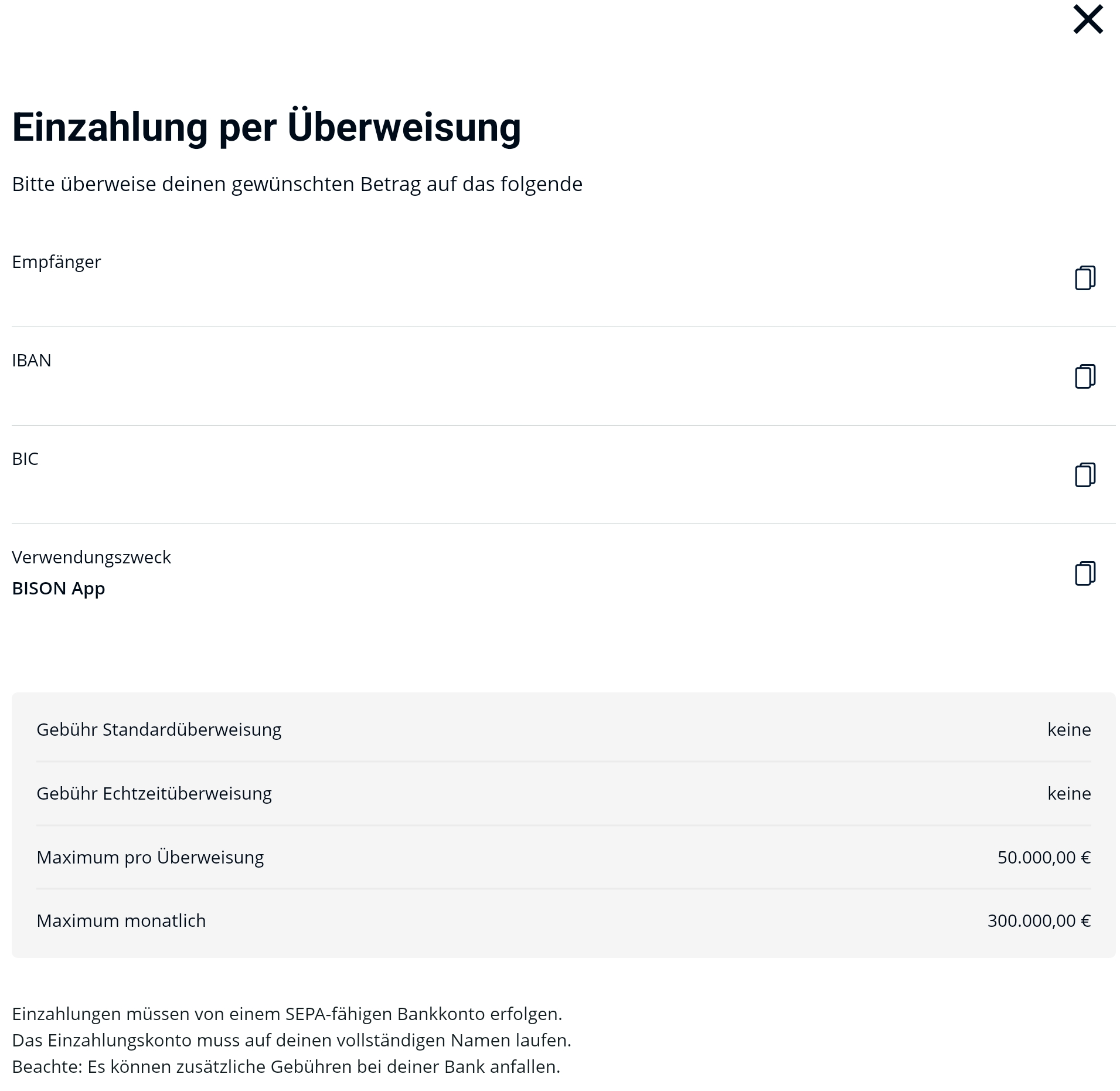
▶ Transfer the desired amount from your bank account to the displayed IBAN
Please note that the account holder of the sender account must exactly match the name registered in the BISON account
For a SEPA instant transfer - initiate this from your bank account to the displayed IBAN
Troubleshooting rejected or missing deposits
If your transfer is rejected and sent back to you, there can be various reasons. Please check if one of the following points applies:
- Deposit limit exceeded
- Monthly limit exceeded
- The transfer came from an account for which you are not the sole authorised person
- The name on your account does not match the one in the BISON app
- The money was sent from a business account, which is not permitted.
If one of the reasons applies, please repeat the transfer and observe the requirements that must be met.
Please contact us with a screenshot of the transfer no earlier than 48 hours after a normal SEPA transfer. For all problems and questions regarding Euro deposits, please use our contact form to contact us directly.