To make trading cryptocurrencies even safer and to comply with legal requirements, BISON implements the so-called Transfer of Funds Regulation (ToFR). Here you will learn what this regulation, often referred to as the "Travel Rule", means for your deposits and withdrawals.
Background: What is the Transfer of Funds Regulation (ToFR)?
The ToFR is an EU regulation that came into force on 30 December 2024 to combat money laundering and terrorism financing. It requires that, for crypto transfers – similar to traditional bank transfers – information about the sender and the recipient must be collected and transmitted. The ToFR strengthens the transparency of financial transactions and supports authorities in tracking suspicious money flows. For BISON, as a regulated provider in Germany, compliance with these requirements is legally mandatory.
Glossary:
Self-hosted Wallet: Wallet under sole control of the user (e.g., Ledger, Bitbox)
VASP (or CASP): Provider of crypto services (e.g., Boerse Stuttgart Digital Custody GmbH as custodian of your cryptocurrencies purchased or deposited on BISON). VASP stands for Virtual Asset Service Provider and CASP for Crypto-Asset Service Provider.
-
Proof of Ownership: Proof of ownership of a self-hosted wallet, for example via:
Automated Ownership Proof: Procedure to simplify creating the digital signature with your wallet
What must I consider for my crypto transactions?
For transactions with self-hosted wallets
From a cumulative transaction value of €1,000: Proof of ownership via Satoshi Test or digital signature is mandatory
Satoshi Test = clearly defined small crypto amount → send from self-hosted wallet to BISON
Satoshi Test amounts are displayed in the following test ranges in the BISON app
Satoshi Test is valid for the wallet for 6 months
-
Exception: Changing wallet addresses (e.g., Ledger/ Bitbox) → Test required for every transaction €1,000. Further information:
For transactions with other crypto platforms/exchanges
BISON must match personal data (name, address, date of birth) with the other platform
Data must be complete and correct in the profile
Data exchange usually happens automatically
Verification: Providing proof for self-hosted wallets
In certain cases (e.g., for higher amounts or in the context of spot checks), we are legally obliged to verify that you actually control the self-hosted wallet you have specified.
How does the proof work? If proof is required, we will request it by email. This usually happens via a so-called "Satoshi Test" (a micro-payment with an exact amount specified by us), digital signature or Automated Ownership Proof.
No need to worry: Our support team will assist you and guide you step-by-step through this verification process if necessary.
What else must I consider for my crypto deposits?
When you transfer cryptocurrencies to BISON, we must be able to trace their origin. You will be guided through the process accordingly in the app:
Deposits – step-by-step (Satoshi Test):
▶ Start deposit from platform/self-hosted wallet
Deposit wallet address of your BISON account under "Account", "Transfer cryptos" and "Deposit cryptos"
▶ If further proof is required → You will receive an email from us
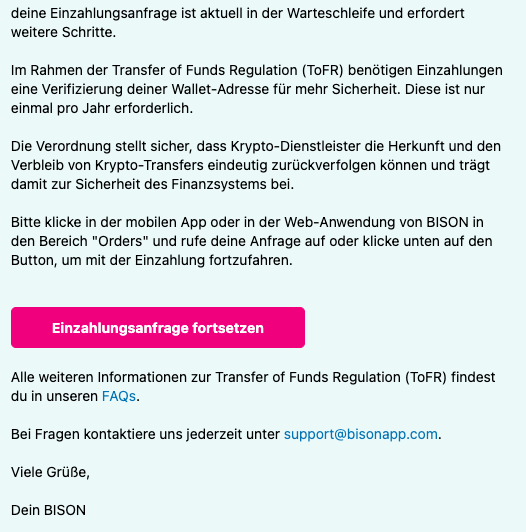
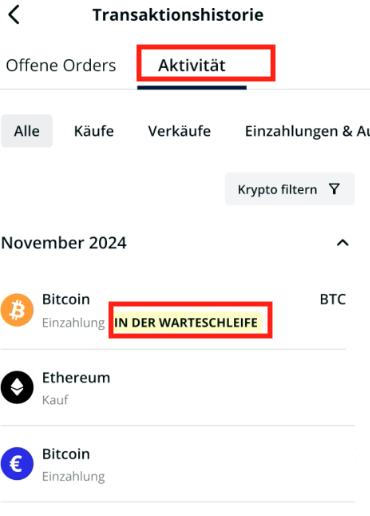
▶ Alternatively: Deposit request directly in app/web under Orders ➞ Continue activities
Click here on your deposit marked as "in queue":
 |
It opens:
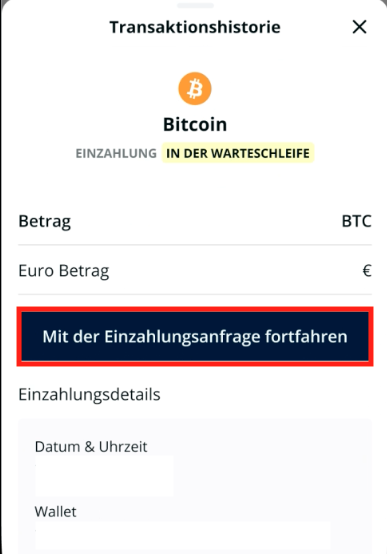 Select "Continue with deposit request"
|
▶ Select origin: self-hosted wallet or crypto platform
Deposit from a crypto platform/exchange: Usually no further steps are required from you. If so, we will contact you.
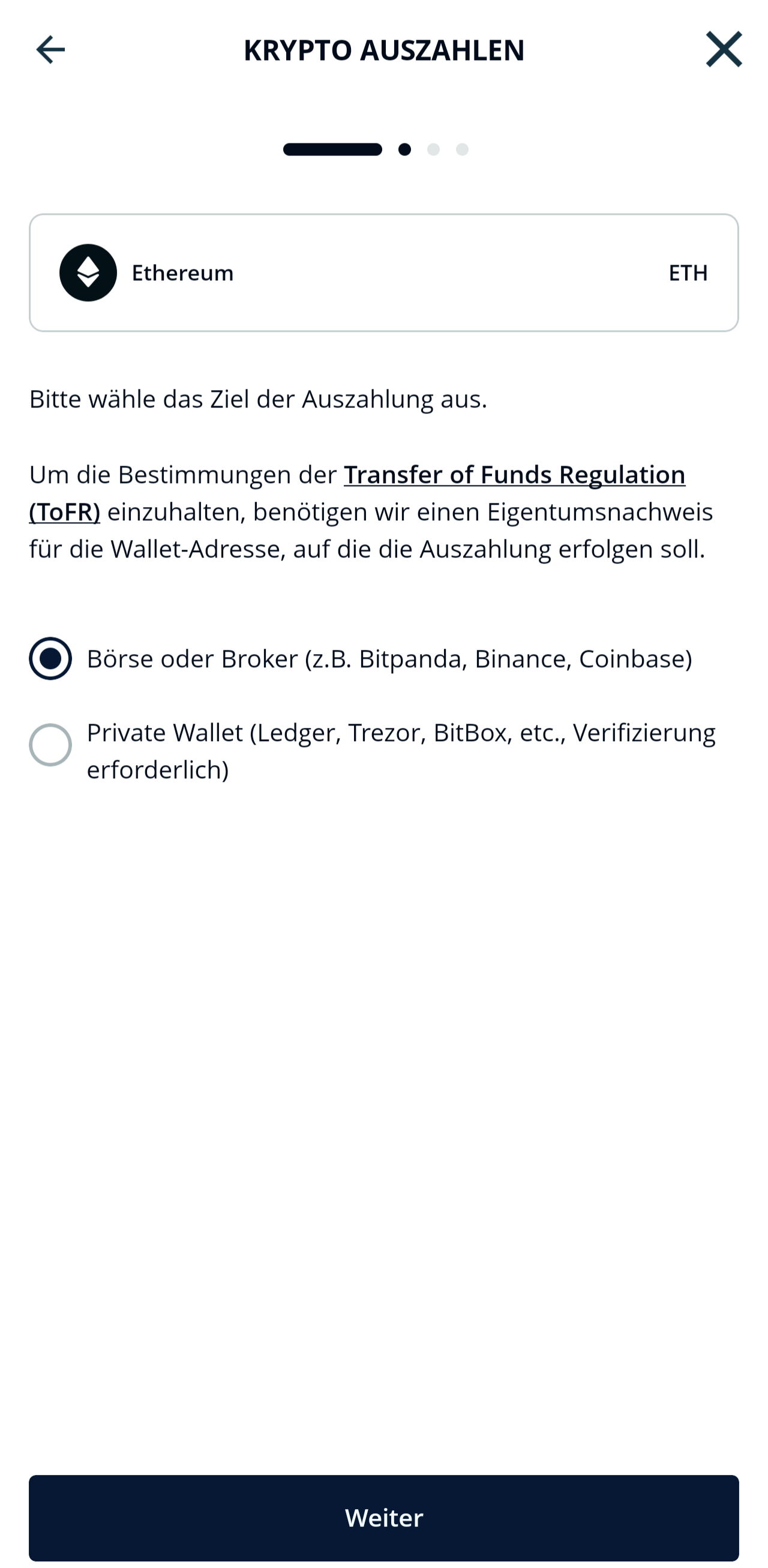
▶ For self-hosted wallet → "Verify now with Satoshi Test"
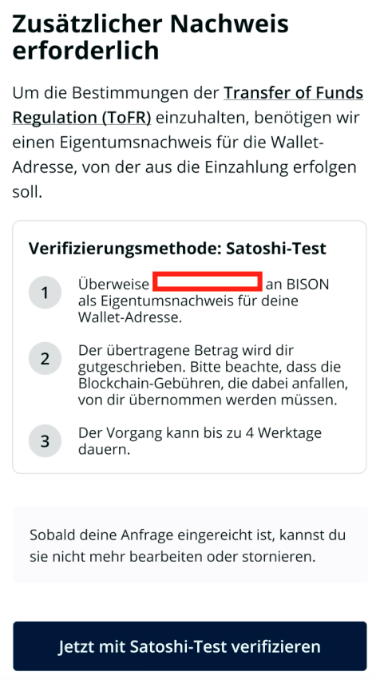 |
It opens:
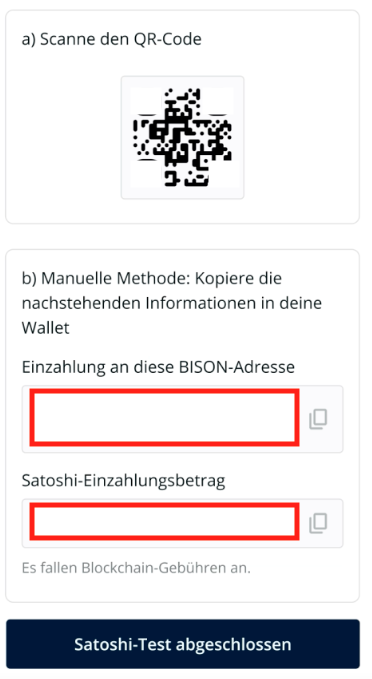
|
Send the exactly displayed crypto amount from your self-hosted wallet to BISON
Completion required within 3 hours
After successful receipt of the Satoshi Test → deposit will be released
Note: The final processing of your cryptocurrency deposit may take several business days in individual cases!
Attention: It is not sufficient to click "Satoshi Test completed". You must make an additional deposit of the exactly displayed amount of cryptocurrency from your self-hosted wallet to your BISON account.
What else must I consider for my crypto withdrawals?
Even when you send cryptocurrencies from BISON to external addresses, the ToFR applies.
Withdrawals – step-by-step (Satoshi Test):
▶ Start withdrawal to platform/self-hosted wallet
Start withdrawal via your BISON account under "Account", "Transfer cryptos" and "Withdraw cryptos". Enter amount and recipient wallet address.
▶ Select withdrawal destination: crypto platform or self-hosted wallet
Withdrawal to a crypto platform/exchange: Usually no further steps are required from you. If so, we will contact you.
▶ For self-hosted wallet and transaction volume over €1,000 → start Satoshi Test
|
It opens:
|
▶ Satoshi Test amount deposited from external wallet to BISON account
After clicking "Satoshi Test completed" the following window appears:
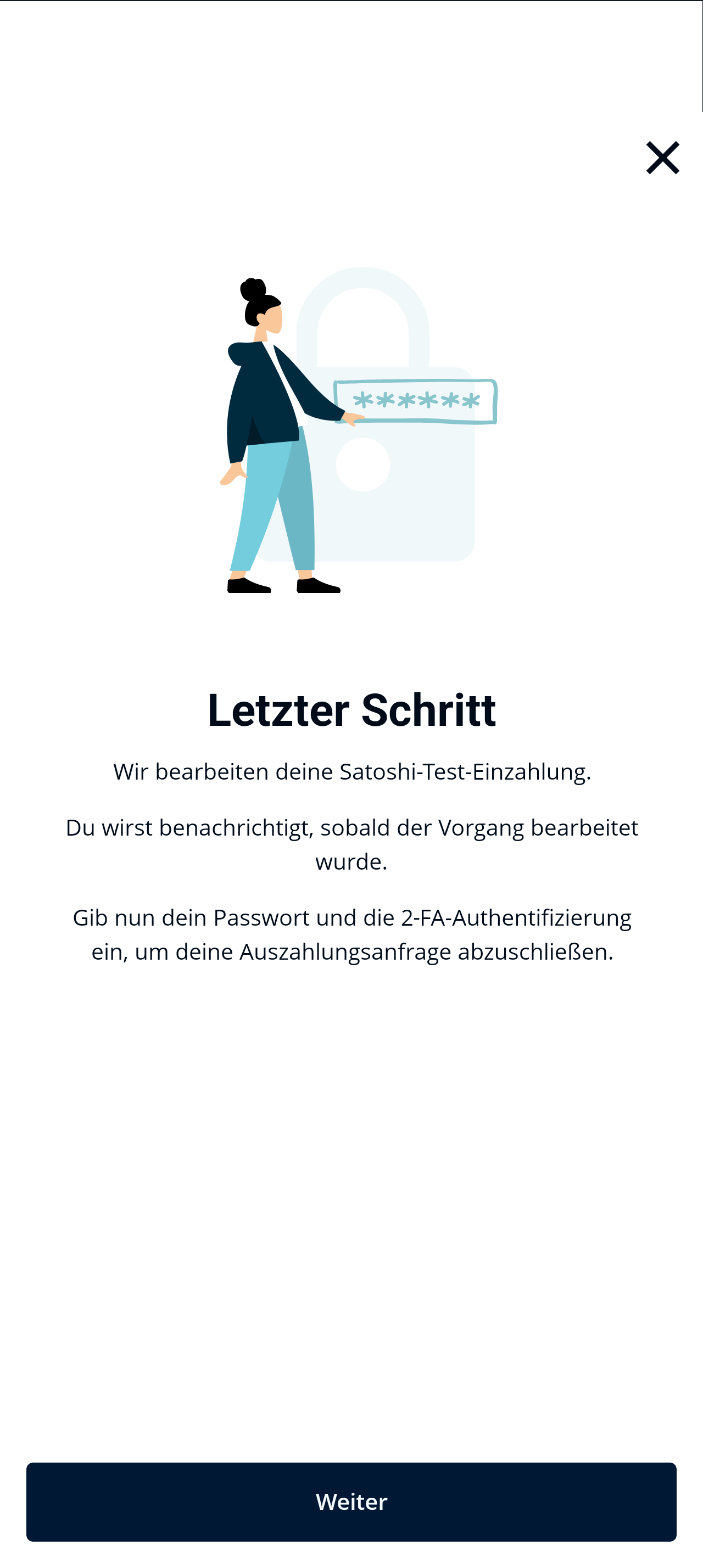
Clicking "Next" continues the withdrawal process.
After successful receipt of the Satoshi Test → withdrawal is usually released after 1 hour
Note: The final processing of your cryptocurrency withdrawal may take several business days in individual cases!
Attention: It is not sufficient to click "Satoshi Test completed". You must make an additional deposit of the exactly displayed amount of cryptocurrency from your self-hosted wallet to your BISON account.
Digital Signature - Step by Step
The Digital Signature is an alternative verification method to the Satoshi Test. As soon as proof of ownership is required for a crypto deposit or withdrawal, the Digital Signature can be selected.
▶ For self-hosted wallet → select "Digital Signature"
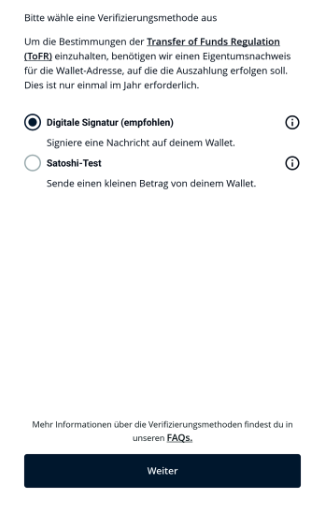
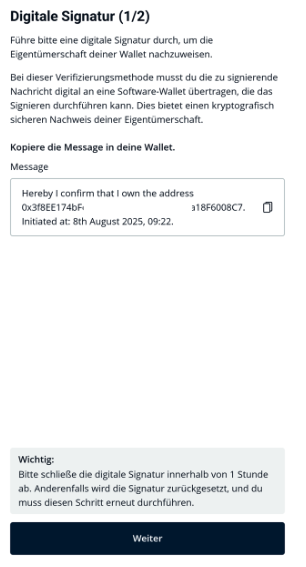
▶ Display of the message to be signed
Please copy the displayed message, preferably using the copy button, and paste it into your external wallet.
In the section "Digital Signature - Further Notes" you will find more information on this.
Once you have signed the message in your wallet, click "Next" to insert the signed message into the BISON app/web.
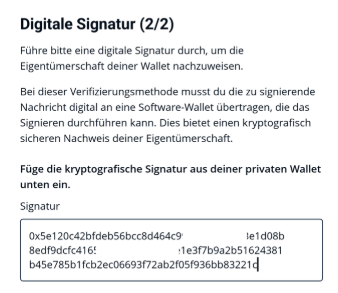
▶ Paste the signed message from your wallet into the BISON app/web
Please ensure that you paste the complete signed message from your wallet.
How digital signing works
How do I sign the displayed message with my external wallet?
Unfortunately, we cannot provide general assistance here, as the signature function can vary depending on the provider. Below you will find websites of popular wallet providers that explain how to sign a message:
Attention: The respective operator is responsible for the content of the websites. For questions about the digital signature of other wallet providers, please contact the wallet provider directly.
We recommend using the automated ownership proof to sign your message. Please ensure that you have the app of your wallet installed on your mobile phone.
If you use BISON Web, make sure to use the browser extension of your wallet or have the software of your wallet installed on your computer.
More about the automated ownership proof can be found under Automated Ownership Proof.
The signed message is shown as invalid in the BISON app/web
Please check the following notes:
a.) Did you use the correct wallet address to sign the message?
For an ETH transaction, an ETH address must be used for the signature (0x.....), for a BTC transaction a Bitcoin address (e.g., b1.....).
The digital signature looks like this (example only!):
- For ETH and ERC-20 transactions: 0xBiee35345ürü35k35g43343kgmkfü2ü23424ijfpl236p334j3
- For BTC transactions: bc1hjfhfhj223xxxx432fkfmexxxx374lfjnrtnd33940xxxxikt33f22
Signing the message for an ETH transaction with a BTC address results in an invalid signature.
b.) Did you copy the complete message from the BISON app/web?
Please also ensure that the "." at the end of the message is copied and signed. It is best to use the copy function via the copy button  .
.
Important notes
Always keep crypto residual amounts ready for the Satoshi Test in your wallet
Bitcoin: Some self-hosted wallets require transfers in Satoshi - 0.00001000 BTC corresponds to 1000 Satoshi (SAT)
ERC tokens: The Satoshi Test is always conducted in ETH
Processing can take longer (manual review possible)
Without complete information → delay or rejection
Data transmission only in accordance with legal requirements
- The blockchain fees incurred by the microtransaction for the Satoshi Test must be borne by you
- The amount of the microtransaction for the Satoshi Test will be credited to your BISON app
- Further information about the status of your withdrawal/deposit can be found under "Orders" -> "Activity"
- There you can also cancel a delivery up to 1 hour after it has started
If you still have questions, you are welcome to contact us via our contact form.